Magical Vakbols: our own online table for Drakar och Demoner, built in a weekend
Blog post #104
On Saturday morning the request was one sentence: build a role-playing platform where we can play together online, and call it Magical Vakbols.
Two days and 17 merged pull requests later, our group has its own table for Drakar och Demoner, the 2023 edition from Fria Ligan. We’re about five players, and Johan is the game master.
What shipped
- Tables and chat. Each table has a code you share with the group. Chat works in character and out of character. Video stays in Google Meet, with one link per table, because building our own video call wasn’t worth it for a first version.
- Dice that follow the rules. A T20 against your skill value, with boons and banes, pushing a roll by taking a condition, and dragon and demon rolls on a 1 and a 20. The roll itself always happens on the server, so nobody can reroll until they like the number. The browser then throws real 3D dice that tumble across the screen and are steered to land on the server’s result. On a dragon roll a red dragon fills the screen, and on a demon roll a demon rises out of red smoke.
- Character sheets and initiative, with the card-based initiative from the rulebook.
- A treasure deck per table. Johan enters the cards by hand. They look like the printed cards, and a drawn card is shuffled back in, as the rules say.
- NPC templates. The game master can put out a group from a template (“Angry dwarf 1–4” plus a leader), give one of them a name when it starts to matter, and finally turn it into a playable character.
- Places. Adventure locations with their NPCs, and fights that belong to a place.
- A battle map. A grid where the game master moves everything around: characters, monsters, walls, doors and obstacles, on stone, grass or village ground. Players can only propose a move for their own character. The game master sees the proposal as a ghost marker and approves or rejects it.
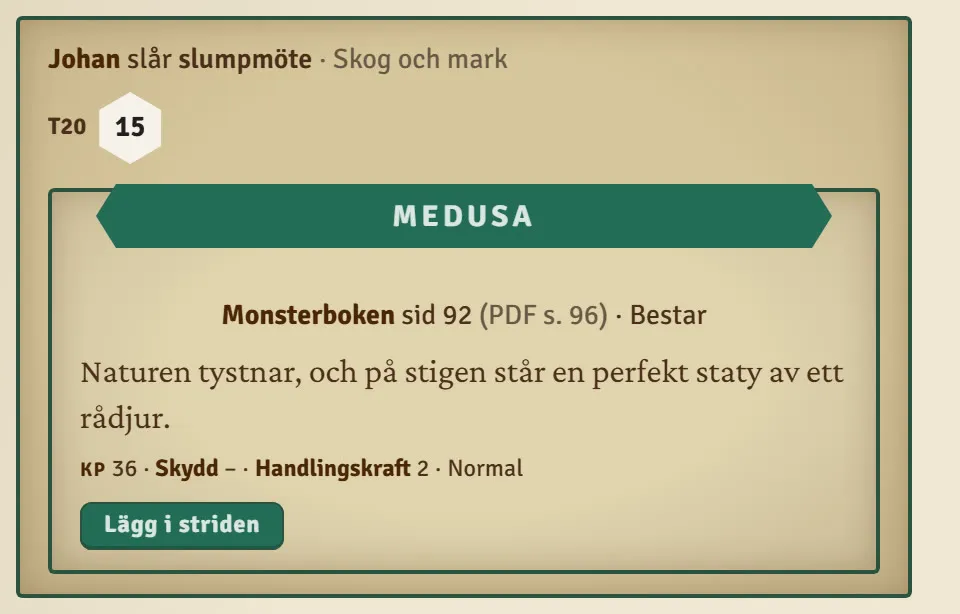
- Random encounters from the Monster Book. More on that below.
- The look. A parchment theme taken from the Drakar och Demoner style guide, and the app installs on a phone like any other app.
Random encounters, and a film that explains them
The rulebook says the game master may roll on a random encounter table once per shift (six hours), and that the table depends on the area. The Monster Book gives every creature its own random encounter. But it has no tables per terrain.
So we made our own: seven T20 tables (forest, mountains, swamp, at sea, plains and roads, caves, ruins and battlefields). Common creatures take several rows and rare ones a single row, so a wolf turns up in the forest more often than a dragon worm. The game master picks the terrain and presses a button, the server rolls, and the chat shows which creature it was, which page of the Monster Book to open, and one line about what’s waiting. One more button puts the creature in the fight with its hit points and armour, hidden from the players until it’s revealed.
There’s an optional house rule: roll a T6 first, and only a 1 gives an encounter. Four encounters a day is a lot.
The guide page now opens with an 80-second narrated film that walks through it all, built in HyperFrames from real screenshots of the app and narrated with my cloned voice in ElevenLabs.
See the guide page and the film.
What’s working
- Several sessions at once. While one Claude session built the random encounters, I asked for a battle map in the middle of it. That went into its own session and was merged before the encounters were done. NPC templates, places and the dice ran the same way.
- The server owns the dice. Every roll, card draw and encounter is decided in the database, and the browser only shows it. That made the 3D dice possible: they’re steered to a result that’s already known.
- A test run on every change. A script creates two throwaway accounts, a game master and a player, plays through the table and checks what the player must not be able to do: change the room, speak as someone else’s character, see a hidden roll, move their own marker without approval. The accounts are deleted afterwards.
What’s unclear or broken
- Dice that hung. When rolls came about three seconds apart, a new throw took over before the previous one had landed, and the old chat card kept flickering. Fixed, with a safety stop so no card can get stuck again.
- The 3D dice library is from 2022 and no longer maintained. It works, but it’s a dependency to keep an eye on.
- Sound needs a click first. Browsers block audio until you’ve clicked somewhere on the page, so other players hear the dice only after their first click.
Decisions made
- Email and password. Anonymous login was on the table, but it was confusing, so it’s out.
- No AI in the treasure deck. The cards are Johan’s. Claude or ChatGPT may have a place in the app later, but not there.
- The book stays in the book. The app doesn’t copy any text from the Monster Book. It shows the creature, the page and our own one-line summary, and the game master reads the encounter in the book itself.
- No Blender. I asked for the dice and the dragon to be built in Blender, twice. It isn’t installed, and a dragon scripted in Blender would have looked clumsy. Codex drew the dice icons, the dragon and the demon as images instead, and they’re animated in the browser.
Tooling & process
- Stack: Next.js 16, Supabase (realtime and row-level security) and Vercel, which deploys every merge to master.
- One git worktree per session. Early on one session ran
git checkout -bin the shared folder and moved another session’s unfinished work onto its own branch without noticing. Since then every session gets its own worktree. - Other tools: Codex for images, ElevenLabs for the dragon and demon sounds and the narration, HyperFrames for the film.
A Saturday sentence, and on Monday the group has a table of its own. Now it’s up to Johan to send us somewhere dangerous.
— Stefan